
 Need Help With Prophecy?
Let Data Perceptions work through it with you, using our open-source, zero-install remote support utility, RustDesk! Alternatively, we are happy to use Microsoft Teams, Google Meet or any other widely available screen-sharing utility.
This page specifically covers RustDesk, which is free, open source and does not require installation. The RestDesk website is https://rustdesk.com/.
Instructions
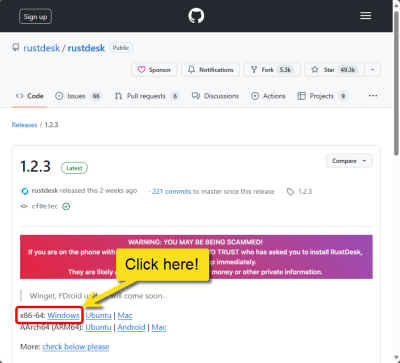
- Download and run RustDesk from https://rustdesk.com (boxed in red in this screenshot). The 'Download App' button takes you to the following page, where you should download and run the file boxed in red:
- You will see the following
screen.
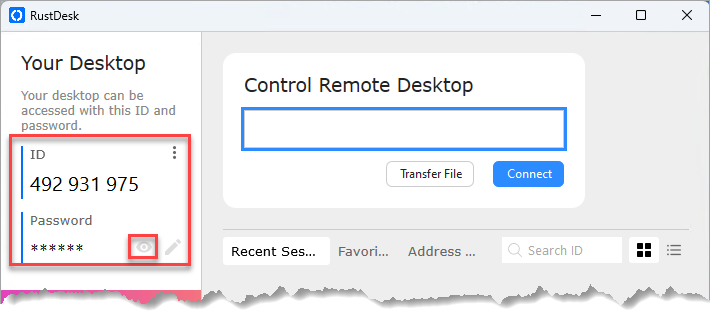
- Call Data Perceptions on +44 (0)1494 785574 to request remote support. You will need to provide the 9 digit ID and the password, as shown in the outer boxed area in the screenshot above. The password is revealed by clicking the eye icon (the inner boxed item in the screenshot).
- Once you have granted access, RustDesk will connect to Data Perceptions across the internet and Data Perceptions will be able to view and control your screen.
- It is impossible for Data Perceptions to re-access your machine (until you next run the utility) once the session has ended and you have closed the Prophecy Live Support application.
Telephone 01494 785574 (UK) to talk to a Prophecy expert now!